A landing page is a standalone web page created specifically for a marketing or advertising campaign. It’s where a visitor “lands” after they click on a link in an ad, email, social media post, or search result.
Learn more: Content Writing Guide for Beginners
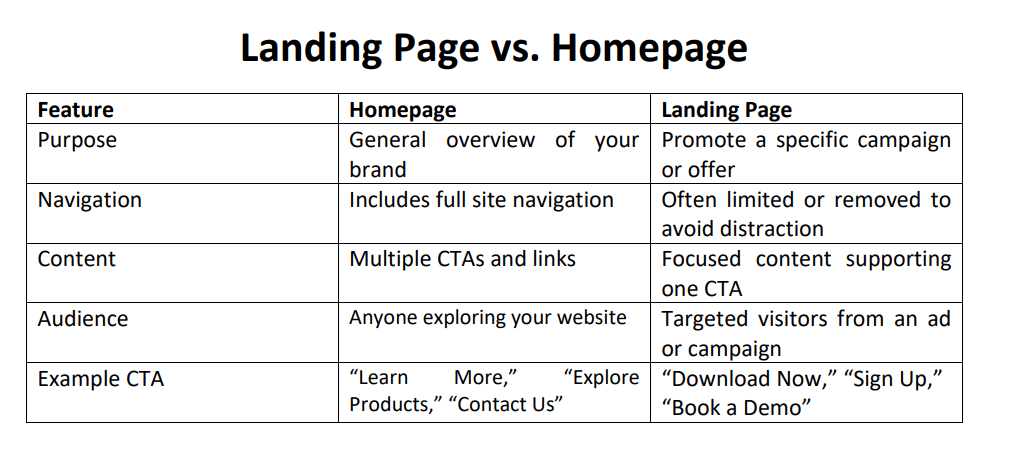
Unlike a homepage, which encourages users to explore, a landing page is focused on a single call-to-action (CTA) — such as signing up, downloading a resource, or making a purchase.
“A landing page is the webpage where people end up after they click your ad. You specify a final URL in your ad to determine where users are taken.”
Google
“A landing page is a web page for collecting a visitor’s contact information in exchange for a resource, like an ebook. You use a lead-capture form to convert the visitor into a lead.” HubSpot
➤ According to SEMrush:
“A landing page is a webpage designed to persuade users to take a specific action—like signing up, purchasing, or registering.”
Why Are Landing Pages Important?
Landing pages are essential because they focus your visitors’ attention on one specific action you want them to take. That clarity can dramatically increase your conversion rate.
Here’s why they matter:
- Laser-focused CTA: One purpose, one outcome. No distractions.
- Boost conversions: With fewer exits and distractions, landing pages outperform homepages.
- Lead generation: Perfect for capturing contact info through forms and gated content.
- Data collection: You can test and track performance (e.g., form submissions, button clicks).
- Campaign alignment: Ties directly to your ad copy, email subject line, or promotional content.
Types of Landing Pages
Landing pages can serve many goals. Here are the most common types:
1. Lead Generation (Lead Capture) Page
Designed to collect user data (e.g., name, email) via a form in exchange for something valuable like:
- eBooks
- Webinars
- Free trials
- Checklists
2. Click-Through Landing Page
Encourages the visitor to click through to another page. Common in eCommerce to:
- Pre-sell a product
- Warm up traffic before checkout
3. Sales Landing Page
Long-form page aimed at selling a product or service directly. These include:
- Benefits
- Testimonials
- Pricing
- FAQs
4. Squeeze Page
A very short form of landing page designed to capture emails — often used in pop-ups or social ads.
5. Thank You Page
Appears after a form is submitted or an action is taken. Offers confirmation and additional steps.
What Makes an Effective Landing Page?
To build a high-converting landing page, keep these essentials in mind:
- Clear, Compelling Headline: The first thing users see should clearly state the offer or benefit.
- Supporting Subheading: Add a secondary line that complements your headline with more detail.
- Visuals or Video: An image or demo video that supports the product/service being offered.
- Concise, Value-Oriented Copy: Focus on benefits, not features. Keep it short and digestible.
- Trust Elements: Include testimonials, reviews, security badges, or social proof.
- Strong CTA: Use actionable language like “Download Free Guide,” “Start My Free Trial,” or “Get Access Now.”
- Minimal Navigation: Avoid extra links that might lead visitors away from the main CTA.
How Does a Landing Page Fit in a Marketing Funnel?
- Attract: Drive traffic through ads, SEO, emails, or social media.
- Engage: The visitor lands on your page and is interested.
- Convert: They take action—submit a form, register, download, or buy.
- Nurture: Use follow-up emails and offers to build a relationship.
Tools to Build Landing Pages
Even if you’re not a coder, you can easily build landing pages using these platforms:
- WordPress (Website Builder)
- Wix
- Unbounce
- Instapage
- HubSpot
- Mailchimp (for email campaigns)
A landing page isn’t just a “nice-to-have”—it’s a strategic tool that drives conversions, grows your email list, and boosts your revenue. Want to learn more about Landing Pages, join our Live, Mentor-Led, Content Writing Training with certification.

 Content Writing Agency in Delhi
4 thoughts on “Landing Page Guide for Beginners”